
Curation desk
How the Ecency curation program works, how to recommend posts and how to apply to become a guest curator.
The curation desk is where Ecency’s volunteer curators find good posts to support. @ecency votes with a large amount of Hive Power, most of it delegated by supporters. The curation rewards it earns go back to those delegators daily, minus any holdback a delegator chooses to leave with Ecency. The curators decide where that vote goes, so their job is reading carefully and choosing well.
Open the desk from the side menu (Curation desk) or at ecency.com/curation.
How the desk works
Section titled “How the desk works”The desk has a few tabs:
- Queue: new posts from every Hive front-end, not only Ecency. Anyone can browse it. Curators also see their team’s marks and notes here.
- My marks: the posts a curator has marked while reviewing (Reviewed, Snoozed, Flagged or Noted). This is a curator tool.
- Recommended: posts that readers have recommended to the curators.
- Guide: “How Ecency curation works”, the full guide for curators.
- Apply: the guest curator application, shown to anyone who isn’t on the curation team yet.
When a curator votes a post, a small group of Ecency accounts follows that vote together within seconds. This is called the trail. The trail follows only listed curators.
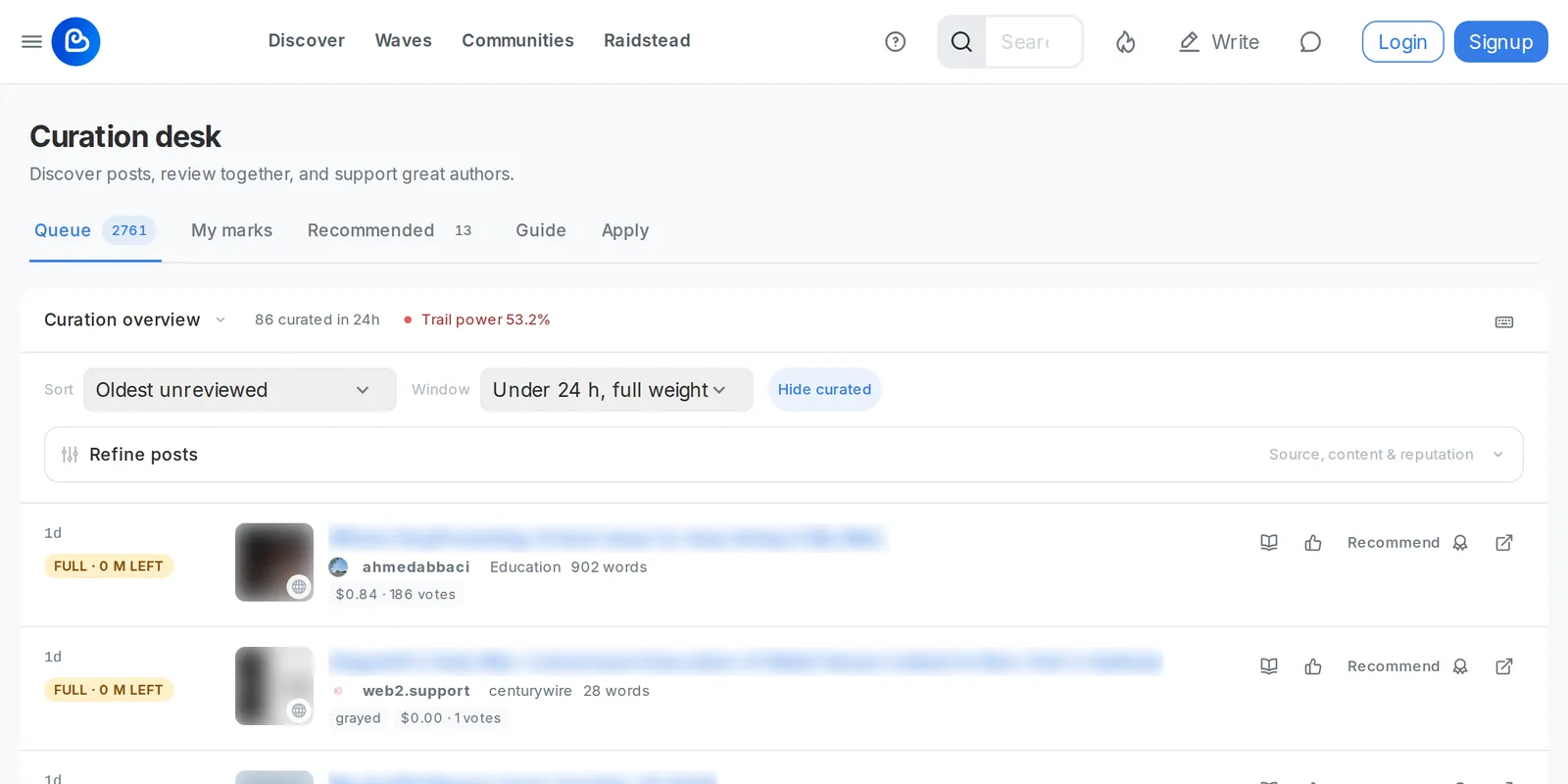
Sort and filter the queue
Section titled “Sort and filter the queue”The queue has a toolbar on top, so you can choose which posts to review. The desk is on the web only.
- Sort: Oldest unreviewed, Newest or Most unique recommenders (recommenders are counted by network, not by account). Curators also get Random, with Reshuffle for a new order.
- Window: show posts by curation window. The default is Under 24 h, full weight. You can also pick Under 12 h, full weight, 24 to 72 h, half weight, Older, one eighth, Last 12 h before payout or All windows. See Best time to vote.
- Hide curated is on by default and hides posts the desk has already curated or closed. Turn it off to see them too. Curators also get Unreviewed only (on by default for them), which hides posts the team has already reviewed or snoozed.
Recommended setup, for everyone: set Window to Under 24 h, full weight and sort by Oldest unreviewed. The posts closest to the 24-hour mark come first, so they get looked at before they lose full curation weight. Curators use it to decide in time. Anyone else can use it to find good posts and recommend them to the curators while a vote still counts in full.
Select Refine posts for more filters:
- Source & discovery: App (Ecency, PeakD or other apps), Community, New authors and Recommended. Curators also get Flagged and Excluded.
- Post content: a minimum and maximum number of Words, plus Has images.
- Author reputation: a minimum and maximum reputation.
Curators also see a count in the toolbar: how many posts match, or the size of the team backlog when filters narrow the queue. Other viewers see no count. Reset clears your filters. When you’re logged in, Ecency remembers your filters in this browser for your account (“Saved filters for @yourname”), so the queue looks the same next time.
How authors get curated
Section titled “How authors get curated”There is no form to submit your own post. Curators read the queue and pick posts on their merits. The guide tells them to look for:
- Original writing or images with visible effort.
- Engagement: the author answers replies.
- On-topic for its community, with readable formatting.
- First posts from new accounts.
- Posts from every front-end, not only Ecency.
Posts that are plagiarised, recycled, image only, tag or community abuse, or part of reward farming are red flags. Posts tagged NSFW, deleted posts and authors on the abuse list are kept out of the public queue.
The best thing you can do is write well, publish in the right community and reply to your readers. The content guidelines apply as usual.
Recommend a post to the curators
Section titled “Recommend a post to the curators”Anyone can point the curators to a post they liked, as long as it isn’t their own. It costs no Points or money, so it’s an easy way to help good posts from friends and other people in your community get noticed. Please do: the curators rely on readers to find posts they would otherwise miss.
- On the web, open the post menu (the three dots) and choose Recommend to curators.
- Pick a reason: Quality, Underrated, Newcomer or Other.
- Select Recommend.
The recommendation is written to the Hive chain with your posting key, so it is public. It costs only Resource Credits (about as much as two votes). There is no daily quota. You can Withdraw it later.
Each recommender has a weight based on the last 90 days. Recommendations that curators curate raise it and ones they dismiss lower it. Everyone starts at x1.0. Ten or more recommendations at x1.2 or better earn a Trusted recommender chip. Weight only changes the order of the Recommended list; it never hides a post. Curators count networks, not accounts, so recommending from several accounts doesn’t help.
Apply to be a guest curator
Section titled “Apply to be a guest curator”Seats are open to anyone while applications are open.
- Open the Apply tab (log in first).
- Read the curation guide.
- Check “How your account looks from here”: your account age, reputation and your record as a recommender. None of this is a rule.
- Answer three questions: why you want to curate, how much time you can give and when, plus a post by someone else that you would have curated.
- Tick “I have read the curation guide.” and select Send application.
The tab then shows your application status: waiting to be read, shortlisted, accepted or not this time. You can Withdraw it while it’s open. If applications are closed, the page says so.
The curation team decides together. Once enough of them endorse you and nobody objects, you join as a guest curator. A guest seat runs for about a month. The trail follows your votes from the first day. At the end the seat ends on its own and you can apply again, or the team can make it permanent. A few hours a week is enough; there is no shift and no quota.
Recommending a few posts first is the easiest way to show how you read.
Curate manually
Section titled “Curate manually”Ecency curators read and vote by hand. Before your guest seat starts, stop any auto-voting on your account: unfollow voting trails, turn off auto-vote services and revoke their posting permission, for example steemauto for hive.vote. See Leave a voting trail.
Top curators on Discover
Section titled “Top curators on Discover”The Curators list on Discover is a separate leaderboard. It ranks accounts by curation reward for the selected period (daily, weekly or monthly) and shows how many votes they cast.