
Settings
Every Ecency setting on web and mobile, from currency and theme to notifications, chat privacy and email digests.
Ecency keeps your preferences in one place on each platform. On the web, open your profile and choose Settings (the address is ecency.com/@yourname/settings). The Settings tab only appears on your own profile while you are logged in. On mobile, open the side menu and tap Settings.
Web settings
Section titled “Web settings”The web Settings page is made of cards.
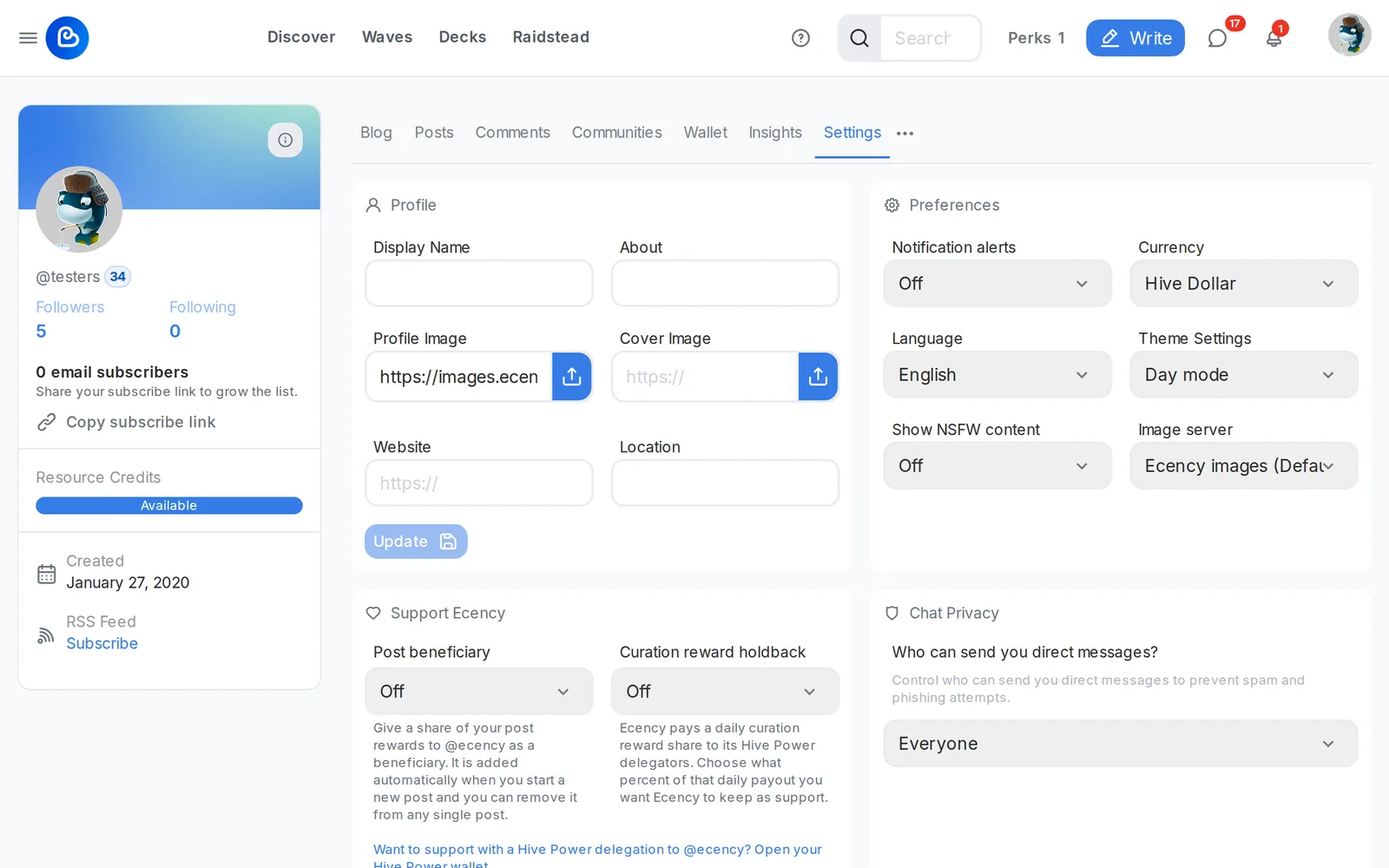
Profile
Section titled “Profile”Edit your display name, about text, profile image, cover image, website and location. See Profile for the details and limits.
Preferences
Section titled “Preferences”- Notification alerts: turn all Ecency notifications On or Off in one switch.
- Currency: the currency used to show estimated values across the site.
- Language: the interface language.
- Theme Settings: System Default, Day mode or Night mode.
- Show NSFW content: On shows posts tagged NSFW, Off hides them.
- Image server: the server that loads images for you. Keep the default unless images fail to load on your network.
Support Ecency
Section titled “Support Ecency”Two optional ways to support Ecency, both Off by default:
- Post beneficiary: adds @ecency as a beneficiary on your new posts at 1%, 5%, 10% or 25%. It is added automatically when you start a new post. You can remove it from any single post.
- Curation reward holdback: if you delegate Hive Power to @ecency, Ecency pays you a daily share of curation rewards. Here you choose what percent (5%, 10%, 25%, 50% or 100%) of that payout Ecency keeps as support.
Chat Privacy
Section titled “Chat Privacy”Choose who can send you direct messages: Everyone, Only people I follow, or No one (disable DMs). See Chats.
Email digests
Section titled “Email digests”Lists every email digest you receive (your notification digest, communities and creators) with its status. You can switch each one between Weekly and Monthly, Leave a single digest, or Stop all Ecency email to your address. Stopping all email does not affect account emails such as password recovery.
Keys & permissions
Section titled “Keys & permissions”Open permissions takes you to your keys and app authorizations. See Manage keys.
Referral link
Section titled “Referral link”Copy your referral link to invite friends. See Referral program.
Per-type notification settings
Section titled “Per-type notification settings”On the web, open the notifications panel and use its menu. Under Sound/Popup Settings you can switch individual types on or off: votes, replies, mentions, favorites, bookmarks, tags, reblogs, follows, transfers, delegations, payouts, account updates, weekly earnings and scheduled posts.
Mobile settings
Section titled “Mobile settings”The mobile Settings screen has these groups.
General
Section titled “General”- Currency and Language.
- Chat Privacy (same three options as on the web).
- Server: the Hive API node the app talks to. The app checks a server before switching to it, and shows Server not available if it is down or behind.
- Image Server: where images load from. Ecency Images (Default), Hive Images (Alternative) or Ecency Images (No CDN). Try another option if images don’t load on your network.
- NSFW: Always show, Always warn or Always hide.
- Appearance: Light, Dark or Device settings.
- Show Images: turn images in posts on or off.
- PIN code: lock the app with a PIN. Once a PIN is set you can also enable Finger Print / Face Unlock and Reset Pin Code. See Forgot your PIN?
Push notifications
Section titled “Push notifications”Turn Push Notification on, then choose the types you want: follow, vote, comment, mention, favorites, bookmarks, tags, reblog, transfers, scheduled post published, delegations, payouts, account updates and weekly earnings. If your device does not support push, you only get notifications while the app is open.
Support Ecency
Section titled “Support Ecency”The same two options as on the web: Share post rewards with Ecency and Hold back part of curation rewards, each with a percent.
Other entries
Section titled “Other entries”- Email digests: tap Manage to subscribe, change cadence, leave a digest or stop all email.
- Manage Authorities: view and manage your keys. The app asks you to secure it with a PIN before it shows private keys.
- Delete Account: sends a deletion request for your Ecency data and logs you out. It cannot erase anything already written to the Hive blockchain.
Muted users and bot comments
Section titled “Muted users and bot comments”Muting people is not part of the Settings page. See Mute users for how to mute and unmute someone.
In the mobile app, comments from known bot accounts are grouped into their own collapsed section under a post, so they do not crowd out human replies. There is no switch for this.